Alles „im Internet bestellen“ ist manchmal weder billiger, noch besser. Das habe ich heute (mal wieder) an einem guten Beispiel gesehen: Ich hatte zwei Muckturnier.org-T-Shirts in der Hand. Von verschiedenen Quellen. Ich habe vor einigen Jahren schonmal welche drucken lassen, aber da ein paar von denen im Schrank geschrumpft sein müssen, waren neue fällig :-) Und da habe ich ein bisschen rumprobiert.
Die letzten Muckturnier.org-T-Shirts hat mir die Firma Maisel (Word of Textiles) aus Konradsreuth bedruckt. Mit einem Digital-Direktdruck wegen einer geringen Auflage. 10 Stück musste ich mindestens abnehmen. Die T-Shirts waren Hakro No. 292, erfreulich gute Qualität. Aber jetzt mussten neue her.
Auf jeden Fall habe ich wieder einen 10er-Satz T-Shirts vom Maisel bestellt, wieder Hakro No. 292, nur eine andere Farbe (weil es die vom letzten Mal nicht mehr gab). Und testweise auch noch eines von Flyeralarm und eines von Spreadshirt. Spreadshirt war ziemlich einfach: Vektorgraphik hochladen und gut. Die von Flyeralarm wollten druckfertige Daten. Das ist ja auch kein Problem, aber man musste das Logo selbst in einem definierten beduckbaren Bereich positionieren, und der musste eine definierte Größe haben. Was letztendlich dazu geführt hat, dass das Logo nicht ganz da gelandet ist, wo ich mir es vorgestellt hatte. Aber darum soll es jetzt gar nicht gehen.
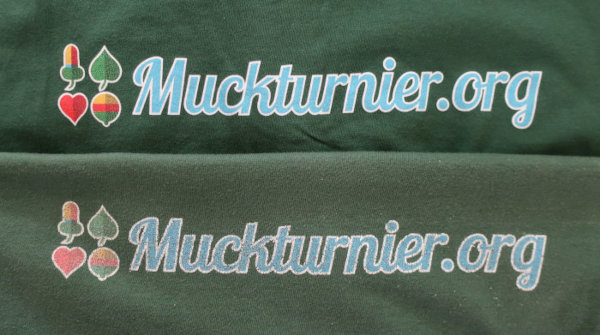
Die T-Shirts haben pro Stück ziemlich genau gleich viel gekostet. „Das Internet“ war vielleicht ein bisschen günstiger, aber nicht tatsächlich relevant günstiger. Und heute hatte ich eben zwei von den T-Shirts gleichzeitig in der Hand. Und so sehen sie aus, nach ein paar Wäschen:
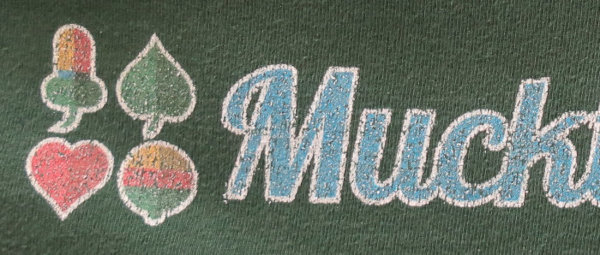
Oben das von Word of Textiles, unten das von Spreadshirt. Das von Flyeralarm sieht vergleichbar aus. Wenn man sich den Druck ein bisschen näher anschaut, dann muss man das eigentlich gar nicht weiter kommentieren.
Hier World of Textiles:
und hier Spreadshirt:
Von der erheblich besseren Stoffqualität des Hakro-T-Shirts ganz zu schweigen.
Manchmal ist es halt doch gar keine schlechte Idee, die regionale Wirtschaft zu unterstützen.
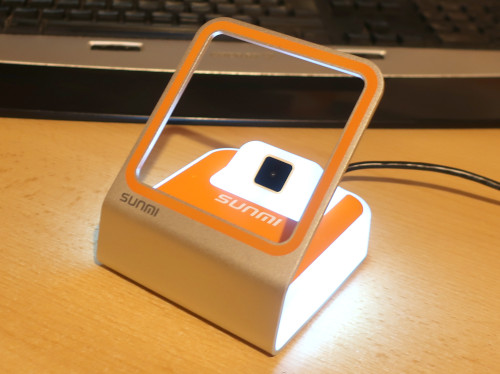
I recently purchased a Sunmi Blink 2D barcode scanner, for more stylish booking code registration with Muckturnier.org ;-)
Indeed, this thingy looks way cooler than a “normal” handheld barcode scanner. I think it’s intended to be used in retail as a POS termial for QR code based payments (like Alipay). However, here in Germany (or Europe?!) this way to pay isn’t too common (we use NFC for that). Thus, the choice for such scanners is not too manifold. However, for a muckturnier, this thing should be the very right device for QR booking code scanning.
The scanner has a configuration manual with special barcodes to e.g. set the keyboard layout, which codes to search for and so on – just like a “normal” barcode scanner (after all, it is one). However, whilst testing it out, I noticed one problem: The scanner did not type encoded spaces. All space characters were simply skipped and omitted.
E.g. the following QR code contains QR Code with a bunch of spaces:
Yet, the Sunmi Blink would type QRCodewithabunchofspaces when scanning it. I also tried Data Matrix, Aztec and PDF 417 – always with the same result: Spaces encoded in the barcode would be ignored when scanning them.
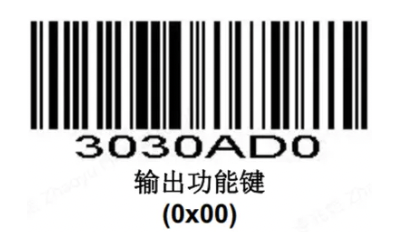
So I decided to file a request at Sunmi’s customer support asking what’s going on here – and I actually got an answer. After writing a few emails and describing the problem, sending some example barcodes and so on the employee finally asked me to try out the following configuration code:
… and it actually did the trick! After having scanned it, the Sunmi Blink typed spaces encoded in a barcode as-is.
This code is actually not printed in the configuration manual. So you have no chance to find it. The Chinese ideographs below are translated to “Output Function Keys” by Google Translator. I would suppose that there’s also a reverse code to turn the spaces typing off again that should read 3030AD1 (like e.g. the two barcodes turning Aztec Code support on and off, which encode 1003281 and 1003280 respectively).
Anyway this seems to be some non-standard barcode format. I can read it using my phone’s barcode scanner Binary Eye and it does decode to 3030AD0, identified as a Code 128 barcode. But when I create a Code 128 barcode containing 3030AD0, the result looks different. Most probably, there’s some special sequence that ensures that the scanner’s configuration is not changed if a real/normal Code 128 barcode containing some configuration sequence is scanned. I thus could not test if one can switch this off again other than resetting the scanner to factory defaults.
However, I hope this helps somebody at some point, as my searches for “Sunmi Blink doesn’t enter spaces” or such didn’t yield any result, and this code seems to be not (yet?) documented officially, at least not for the Sunmi Blink. But after all, my Sunmi Blink now types spaces :-)
Akademy is the annual world summit of KDE, one of the largest Free Software communities in the world. And I'm a proud member of it :-) Also, I could finally meet Johannes Zarl-Zierl, the maintainer of KPhotoAlbum in-person. You can read more in KPhotoAlbum's news.
This was really a nice experience. I hope I can go again soon!
Exactly today 10 years ago, I officially became a KDE Developer, after receiving the following mail:
Hi Tobias,

Your account has now been converted to a developer account.
The username for SVN is "tleupold". Please find instructions attached.

Thanks,
Ben Cooksley
KDE Sysadmin
Ben Cooksley is still KDE's Sysadmin btw :-)
I started working on KPhotoAlbum some time back in April 2014. I had no clue about C++, but I thought one should be able to tag areas on photos. I had no clue about how to add this either, but I decided to at least do anything about this. So I cloned the KPA code from GitHub (which actually only was a mirror of the official repo, but I didn't kew this either) and messed with the code. It was my first attempt to work with a compiled language at all.
After a lot of trial and error, I managed to add a checkbox saying "tags for this category can be positioned" or such, and I also managed to make the setting persistent, by looking how this was done with other options.
Being quite happy with that, I filed a merge request, only stating that I managed to add an option, and maybe someone would think this was a nice idea. Well, and this became an actual milestone in my "Open Source Carreer": Johannes Zarl-Zierl, then one of KPA's devs, now the project maintainer, took me under his wings and effectively teached my how to code C++, as an outstanding coach with angelic patience.
Without Johannes' unremitting support back then, I most probably would still be stuck messing with some scripted languages, and I would most probably never have tried to write GUI programs at all. This really changed a lot for me, and for what I do in my free time ;-) I would possibly never have started "real" programming. So I want to say this again: Thanks a lot and kudos to Johannes Zarl-Zierl!
May the next 10 years be as nice and as productive as the last ones.